
Sensor care
The sensor head and its cable are sealed against fluids. The USB plug is not: keeping it dry is the single most important habit for a long sensor life.
What to clean, and how
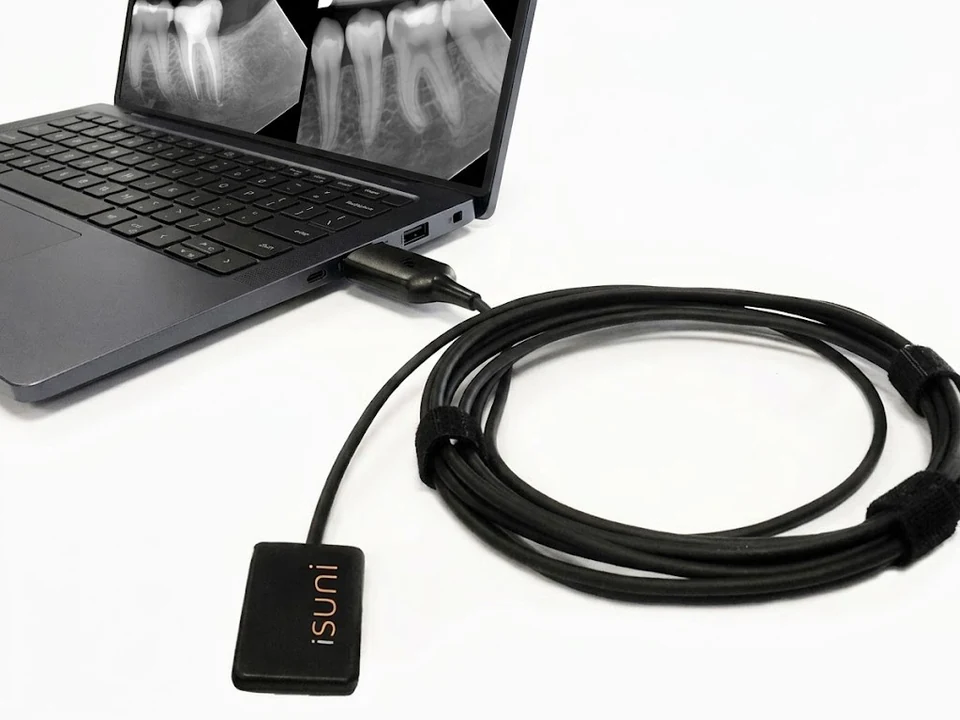 1Sensor head: sheath, then 70% alcohol2Cable: wipe, stop 15 cm before the plug3USB plug: keep dry
- Sensor headNew sheath, then alcohol
A new single-use barrier sheath for every patient. Afterwards, wipe with a soft cloth dampened with 70% isopropyl alcohol.
- CableWipe, then stop
Wipe the cable the same way, and stop about 15 cm before the USB plug.
- USB plugDry cloth only
Never wipe it with alcohol or disinfectant wipes, and never plug it in while damp.
Between patients
- Before each exposure, cover the sensor with a new single-use barrier sheath.
- After the exposure, remove and discard the sheath.
- Unplug the sensor, or make sure the plug stays dry, before cleaning.
- Wipe the sensor head and cable with a soft cloth dampened with 70% isopropyl alcohol, stopping about 15 cm before the USB plug.
- Let it air-dry before the next sheath goes on.
Never
Sealing keeps water out; strong chemicals and heat wear the seals down over time.
- Soak or immerse the sensor in any disinfectant
- Autoclave, chemiclave or heat-sterilize it
- Use cleaners other than 70% isopropyl alcohol on the head and cable
- Wipe the USB plug with alcohol or disinfectant wipes
- Plug in a damp USB connector
Why the USB plug must stay dry
The sensor head and cable are sealed to IP67. The USB plug, with the sensor’s electronics inside, is not sealed.
- Disinfectant wipes dissolve the plug’s label. Hospital wipes with quaternary ammonium and alcohol act as solvents: the printed serial and regulatory label fades, smudges and peels.
- Liquid wicks into the seams. The plug housing is two pieces with no gasket. A wet wipe draws fluid through the seams onto the circuit board inside.
- Power plus moisture corrodes the contacts. When the damp plug goes back into a computer, its 5 V supply drives corrosion on the board and the USB pins.
- Then the problems start. Images fail to capture now and then, the sensor disconnects when the cable moves, and Windows reports “USB device not recognized”. In the end, the sensor can stop working altogether.
Wipe the plug only with a dry, lint-free cloth. Liquid damage to the USB plug is not covered by the warranty: a faded label or corrosion on the contacts shows that liquid reached it.
Moving the sensor between operatories?
Leave a USB extension cable plugged into each workstation, with its end away from the chair. Staff then connect the sensor there, so the sensor’s own plug stays out of the splash zone and nobody is tempted to wipe it.
Signs to call us
Stop using the sensor and contact support if you see any of these.
- Images fail to capture now and then, or the sensor disconnects when the cable moves.
- Windows reports “USB device not recognized”.
- The label on the USB plug is fading, smudged or peeling.
- Green or white residue on the plug’s contacts.